Digital Foci Photo Elite – Photo Backup Device Review

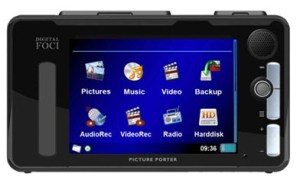
As you may know from reading other posts here or from checking out my photo site, I use a Nikon D300 and a Nikon S550 camera. I have about 16GB of CF cards for my D300 and an 8GB SD card for my S550, but these are not enough for a week long vacation where I’m going to be taking quite a few pictures. For past trips, like the trip I took to Boise, ID for a week, I have taken my older laptop with me. And while on that trip I bought a 160GB USB hard drive as a second backup device. As you can imagine, a laptop is not a convenient device to carry on a trip.
Continue reading “Digital Foci Photo Elite – Photo Backup Device Review”

Vista Virtual Store or “Where did my files go?”

Windows Vista “virtualizes” the file system under Program Files or Program Files(x86) to limit the security exposure of programs writing to the protected program areas. Under previous versions of windows, programs would often write program data to the same folder, or a subfolder from, the location of the program – Program FilesSome_Program. This potentially causes a security issue since programs are writing to the area where the install occurred. This could cause instability for the programs or for other users on the system.

But the problem is that we have come to expect that we need to look in this area to backup our data files left from programs. And when we want to move to a new system, either with a newer or the same operating system, we need to find these data files and move them or back them up. Where did they go??

Continue reading “Vista Virtual Store or “Where did my files go?””

Spore – Creature Creator Trial is Great Fun

The Spore Creature Creator Trial is free and is great fun. You can save, take pictures and movies of your creatures. And you can share them on the website. The only limitation is that there are only a few body parts to use and a few texture layouts. But the Creature Creator is so easy to use and so much fun, it’s worth the time even if you don’t ultimately buy the Spore Game.

Continue reading “Spore – Creature Creator Trial is Great Fun”

Vista x64 Hall of Shame

Here is a list of products that do not support Vista x64. This is shameful for several reasons:

  1. Vista is the currently shipping OS and x64 is the “Ultimate” expression of that OS.
  2. Vista x64 is the second generation of x64 OSs, so it is hardly brand-new and the requirements for supporting the system are well known
  3. Most medium to high end systems are x64 capable.
  4. Most high end system support as much as 4GB of memory.
  5. One can only make use of 4GB of memory with an x64 edition OS. With an x86 edition one only can address 2.7 or 3.5GB of memory depending on the hardware available. See this Alienware Support post.

Continue reading “Vista x64 Hall of Shame”

Alienware System Configuration

SS_00083

EVGA NForce 680I SLI MB
CORE 2 QUAD EXTREME 2.66GHZ QX6700 8M Cache
4 GB Memory
EVGA NVIDIA GEFORCE 8800 GTX 768MB PCI-E
2 SeaGate 250GB HD, 8MB Cache, 7200 rpm in Raid 0 Array [System and Programs]
2 Western Digital 250GB HD, 16MB Cache, 7200 rpm in Raid 0 Array [Video]
NEC [OptiArc] DVD RW AD-7170A Dual Layer DVD burner
Sony DVD RW DW-D26A Dual Layer DVD Burner
ATECH 28 IN 1 MEDIA READER
Samsung 210T 21″ LCD Monitor 1600×1200 resolution
Logitech Comfort Wireless Keyboard / Mouse

Running Retail Windows Vista Ultimate x64 operating system

As delivered by Alienware the configuration was:

===========================
1 | AREA-51 7500-R4

1 | FULL-TOWER BLACK CASE 2.0B
1 | EVGA NFORCE 680I SLI MB
1 | D- CORE 2 DUO EXTREME 2.66GHZ QX6700 8M
4 | PDP 1GB DDR2 LOW LATENCY PC-6400 AW96
2 | SEAGATE 250GB SATA 3G 7200RPM 8MB CACHE NCQ
1 | NEC 18X DUAL LAYER DVD±R/W RAM RECORDER
1 | ATECH 28 IN 1 MEDIA READER
1 | INTEGRATED HIGH-DEF AUDIO NVIDIA C55-MB
1 | EVGA NVIDIA GEFORCE 8800 GTX 768MB PCI-E
1 | VISTA ULTIMATE COA 32 BIT
1 | ALIENWARE DIGITAL DOWNLOAD STORE
1 | ALIENFX SOFTWARE VERSION 1.05
1 | POWERDVD 7 FOR VISTA 8CH
1 | NERO 7 R5.9 DL
1 | VISTA RESPWAN KIT
1 | SYMANTEC GHOST CORPORATE VERSION 8 (LICENSE)
1 | OWNER IDENTIFICATION CARD
1 | ELC TO MOTHERBOARD PWR/HD CABLE REV3
1 | ELC TO MOTHERBOARD USB CABLE REV3
1 | ALIENWARE MAIN BOARD RGB REV 4
1 | CONTROL ELC SW CARD
1 | AVC PENTIUM 4 DUAL CORE HSF Z9H741K001
1 | GX2 G80 DUAL SLOT CARD KEEPER
1 | 1 KILOWATT OEM ATX PSU
1 | 1 KILOWATT MOUNTING BRACKET AMTEK
1 | 1 KW POWER CORD
1 | 3.5? TO 5.25? EXTERNAL DEVICE ADAPTER
1 | ELC MAGENTA
1 | RAID 0 STRIPING 2 DRIVES
1 | 4-YR 24/7 WARRANTY
1 | ON-SITE WARRANTY
1 | PERIPHERALS
1 | BLACK BASIC OPTICAL MOUSE
1 | ALIENWARE MOUSE PAD
1 | VISTA RECOVERY DVD
1 | VISTA SUPPORT CD – AREA-51 7500 R4
1 | NERO 7 R5.9
1 | ALIENWARE DESKTOP BINDER VISTA
1 | STANDARD KEYBOARD BLACK

Adobe Premier Pro CS3 – but alas, not for 64bit Vista

I’m a long time user of Adobe Premier. Most recently 6.5.
The Box

I’ve just upgraded my hot new Alienware Area-51 7500 system to Win Vista Ultimate 64bit to take advantage of all the memory and processor features, but alas, Adobe is still stuck in the weeds. According to the Premier Software Specifications page, Premier does not support 64bit Vista. That seems odd, since there is nothing on the platform that cannot easily be supported, even if they only support it in 32bit compatibility mode.

After all, Windows Movie Maker runs in native 64bit mode. And Nero Ultimate 7 contains Nero Vision which works fine on 64 bit – in compatibility mode no doubt.

Well I guess there is no compelling reason to upgrade my Premier license to Pro CS3, since it won’t run on my system. And Win MM and Nero Vision work fine for capture of DV, editing of mpg and creating DVDs in both DVD5 and DVD9 format. I’ve tried them all.