Personal Cloud Databases – DHX QT Shows Promise

As we have seen in previous articles, I’ve been looking at what we might call Personal Cloud Databases. There are many Cloud Data tools out there. I found a review article here, and then looked at these and other alternatives.

  • ZOHO Creator – 3 apps free. $15/mo basic plan.
  • Dabble DB – free public data. $24/mo for private data. Very cool concepts.
  • Web Office – $53/mo includes data.
  • Google Docs – Free. No database. Spreadsheet only.
  • BaseCamp – No free option. Starts at $24/mo.
  • Windows Azure – Clearly not personal. Impossible to tell what it would cost.

And there are more, mostly pitched at small businesses and enterprises, and expensive. At least very expensive compared with Blogging or Photo Galleries. So my question is: Why are database tools so expensive compared with Blogging and Photo tools, which are usually free or almost free? The reason I believe is Open Source.

I think there is a very interesting opportunity for a platform, like WordPress for personal data tables.

Continue reading “Personal Cloud Databases – DHX QT Shows Promise”
DHX Quick Tables

As you may remember from a previous article, I have been using ZOHO creator to store MMO game data while I play the game to keep track of my characters and their loot. I was not happy with the ZOHO solution due to it’s high cost – $15/mo beyond 3 databases [applications]. While I have not yet exceeded that, I desire a solution that will live on my hosting service where I have unlimited storage/databases.

I have found a solution with DHX Quick Tables, and for now I’m using that as we will see. Continue reading “DHX Quick Tables”

Open Office iCal Importer

I have started using Google calendar and now I want to analyze the events that I’m saving. Google provides a calendar, but no tools to analyze the events on a calendar. Also they only provide iCal format export of the calendar and no way to move the calendar to Google Docs. An iCal importer for Open Office Calc would have the widest appeal and widest platform support. I have written a simple importer for Open Office 3.1.1. I have not tested it on other versions of OO. You can download it here: iCal_Import_04 The download link it as the top of the page. Wave your cursor at the top of the page to see the V symbol for the download link. Enjoy. BTW, WordPress.com does not allow posting of any zip files so I had to move the file to google drive.

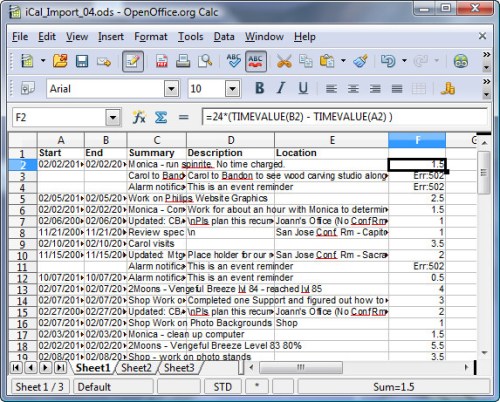
After an Import

One of the things that I needed to do was to add up times that I spent on certain activities. By adopting conventions about how to fill in the event summary field, and adding a column for Duration, it’s easy to do this. To use the importer, download it and unpack it to your hard drive. You may need to adjust your Security settings to allow macros to run, and possibly set a folder on your hard drive as a trusted source. Open the spreadsheet with Open Office 3.1.1 or later. I suggest you Save As… to a new name as soon as you open it to avoid modifying the original file. Once you have saved it with the name you like, run the main macro as follows:

Continue reading “Open Office iCal Importer”

Ubuntu Karmic Koala Windows File Sharing

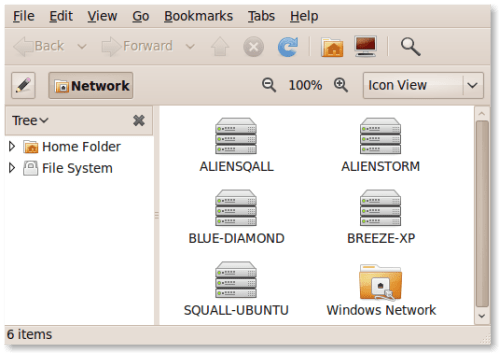
So, when you install Karmic Koala [9.10], you still don’t get Windows File sharing [SAMBA], and setting it up is still a few undocumented and obscure steps. I covered this before for Gutsy, but things are a little different with Karmic, so I’ve redone the screen shots and directions.

If you could Google for “Ubuntu Samba Install” and get a page that told you what you wanted to know, then I wouldn’t do this post, but you don’t get a good page. This page is not that helpful. It looks it was written in the dark ages and it does not configure WINS so that you can PING the other systems on your network.

So here’s the real scoop, which is a modified version of this post I did for Gutsy.

Continue reading “Ubuntu Karmic Koala Windows File Sharing”

Karmic Koala – File Sharing, and Display Size Glitch

I just upgraded my Ubuntu Linux system to Karmic Koala [ 9.10 ] from Gutsy Gibbon [7.04]. As you can tell, it had been some time since I had upgrade. The good news is that the upgrades, through 8.04, 8.10, 8.04, to 9.10, went without a hitch, although they took over 3 hours.

And network file sharing, SAMBA or SMB, works without a hitch with no modifications to the built in configuration. Hurray!!!. You may remember a previous post about Ubuntu Not Playing Nice that showed the modifications that I had to do to BIND and to SMB configuration to get things to work. UPDATE: file sharing worked because I had fixed it in Gutsy. It still DOES NOT WORK OUT OF THE BOX with Karmic Koala.

See this post for how to start to make it work with Karmic [9.10].

Continue reading “Karmic Koala – File Sharing, and Display Size Glitch”

It’s About Monetizing Me

Recently a TWIT podcast brought up some interesting points about privacy. But maybe it’ s not about Privacy. I’m not the first to say this. Maybe it was Leo in one of his podcasts. But I’m taking up the call.

TWIT 225 Schmidt Happens

Maybe it’s not privacy, but monetizing. It’s about “monetizing me”. Obviously Facebook, Twitter, google, netflix and the other sites are making money by selling our info. But they aren’t paying us for it. I might be disposed to make a lot more information available and public on those sites if I were being paid by Facebook and the others to do that. The more information that I share and make public the higher the rate / month that they send to my PayPal account.

Continue reading “It’s About Monetizing Me”

Netgen 4.9.11 Crash on Sample File

I tried Netgen 4.9.11 on a simple STL file and it crashed.

Problem signature:
Problem Event Name:    APPCRASH
Application Name:    netgen.exe
Application Version:    4.9.11.0
Application Timestamp:    4aaaabd3
Fault Module Name:    netgen.exe
Fault Module Version:    4.9.11.0
Fault Module Timestamp:    4aaaabd3
Exception Code:    c0000005
Exception Offset:    000c1fee
OS Version:    6.0.6002.2.2.0.256.1
Locale ID:    1033
Additional Information 1:    fd00
Additional Information 2:    ea6f5fe8924aaa756324d57f87834160
Additional Information 3:    fd00
Additional Information 4:    ea6f5fe8924aaa756324d57f87834160

Read our privacy statement:
http://go.microsoft.com/fwlink/?linkid=50163&clcid=0x0409

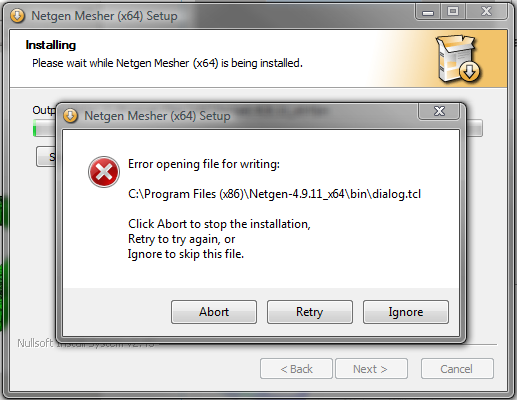
Also the install on Vista x64 SP3 is broken in the presence of Account Control ON which is the normal case for Vista. It gives an error as indicated in the following picture:

Install_Error

Here is a ZIP file of all the files including the STL file that caused the crash.

Netgen_Crash_Gengon

Thanks,

Windy

Microsoft Security Essentials – Coming to a Computer Near You

Update: MSE is available now for everyone. On 3 October 2009, I have moved all my computers from AVG Free to MSE.

Microsoft has entered the business of AntiVirus software by simplifying and repackaging their Corporate Security suite for home users. The new program is called Microsoft Security Essentials. When this is released, it will be free for use by non-commercial users and will run on Windows XP, Vista and Version 7.

Currently the Beta is closed, but the program will be available later this year. Based on all the reviews I’ve seen – Security Now for example – this is a light weight, but very robust anti-virus.

When this comes out I will be installing it with an eye toward eliminating my use of Free AVG.

More news when it appears,

– windy

Hypercosm Fails in Firefox 3.X

Update: Fixed in a new release of the Exporter. A working version of the scene is here.

Fails in Firefox 3.0.12 and 3.5.2. Website reported as a failed site.

Using Max 2009 on Vista x86, SP1, I created and exported a simple scene with a knot, 3 lights and a camera.

Here is the scene on this website.

The model does not play in Firefox 3.0.13, either from the file system or from this website.

It does play in MS IE 8 both from the file system or from the website.

The samples on the hypercosm website play in both MSIE 8 and Firefox 3.

Continue reading “Hypercosm Fails in Firefox 3.X”