Microsoft Security Essentials Definitions 1.115.410.0 shows a false positive for a virus in LibreOffice as it installs on windows. Here are the details:

Click for a larger view.
– ww

Articles containing information to solve problems.
Microsoft Security Essentials Definitions 1.115.410.0 shows a false positive for a virus in LibreOffice as it installs on windows. Here are the details:
Click for a larger view.
– ww
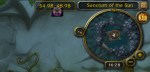
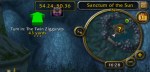
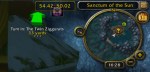
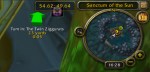
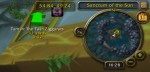
There is an issue with display of tomtom way points in the compass circle map. As you get closer they move on the compass map.
Here’s an example:
World of Warcraft has a free to play starter edition with restrictions. Some are:
But you can have up to 10 characters per account so you can explore a lot of the world and figure out how things work.
Add Ons EcoSystem
World of Warcraft has a huge ecosystem of AddOns that add and change functions of the program. I needed a way to see my coordinates on the map to match up with quest descriptions. There are a ton of map addons so I chose a simple one. You can find TomTom here and comment on it here.

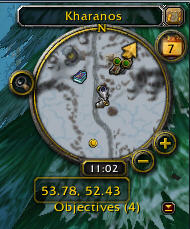
Here’s the compass of Wow without TomTom – Where Am I? With TomTom no problem I get the coords at the bottom. Continue reading “TomTom – Wow Addon for Mapping”
I recently upgraded to Firefox 4 on ubuntu 10.04. I did this by setting the ppa as described in many places: For example:
   sudo add-apt-repository ppa:mozillateam/firefox-stable
   sudo apt-get update
   sudo apt-get upgrade
After doing this, firefox has been working for many days just fine. On several of my systems [ 3 of my systems ]. Now I come back to one of my 10.04 systems and find that the menus of firefox are unresponsive. They do not work at all. The book marks do not work. Processor is not busy. Plenty of memory. Network is working fine. If I type into the google search bar and type enter I get a page and I can navigate from there, but the menus and bookmarks are totally unresponsive.
What gives? I have rebooted the system and nothing changes. Menus work fine in other apps, for example System Monitor. and the Window Manager menus are fine. Menus work fine in the web pages. Bookmark menus highlight, they do not pull down. Menus on the menu bar do not pull down. Toolbar buttons work fine.
Reply
I fixed the problem by starting firefox in a terminal. Works when you start it that way, and works fine afterward. This problem was reported by me ages ago ( i forgot actually). http://ubuntuforums.org/showthread.php?p=10081127#post10081127
Back in Nov 2010. Strange. but the bug is still with us after all this time.
– windy
see attached troubleshooting info:
Just images I’ve uploaded to put into game forum posts by linking here.
The latest email from OpenDNS has been flagged by Windows Live Mail on Windows 7 as a phishing attempt apparently:

Here are the details from the email:
Return-Path: <newsletter-bounces@opendns.com>
Delivered-To: GMX delivery to windyplayer@gmx.com
Received: (qmail invoked by alias); 17 Feb 2011 17:55:07 -0000
Received: from m67.sfo.opendns.com (EHLO m67.sfo.opendns.com) [67.215.68.105]
 by mx0.gmx.com (mx-us001) with SMTP; 17 Feb 2011 12:55:07 -0500
Received: from m54.sfo.opendns.com (m54.sfo.opendns.com [67.215.68.145])
 by m67.sfo.opendns.com (8.14.3/8.14.3/Debian-5+lenny1) with ESMTP id p1HHt7AN005450
 (version=TLSv1/SSLv3 cipher=AES256-SHA bits=256 verify=NOT)
 for <windyplayer@gmx.com>; Thu, 17 Feb 2011 17:55:07 GMT
Received: from localhost ([127.0.0.1] helo=lists.opendns.com)
 by m54.sfo.opendns.com with esmtp (Exim 4.69)
 (envelope-from <newsletter-bounces@opendns.com>)
 id 1Pq84E-0008Pa-4k
 for windyplayer@gmx.com; Thu, 17 Feb 2011 17:55:02 +0000
Date: Thu, 17 Feb 2011 17:55:02 +0000
To: windyplayer@gmx.com
From: Allison Rhodes <marketing@opendns.com>
Subject: [OpenDNS] February 2011 Newsletter - Home Edition
Message-ID: <50d3d7955f49e9336720738ab05c89a1@lists.opendns.com>
X-Priority: 3
X-MessageID: 101
X-ListMember: windyplayer@gmx.com
Precedence: bulk
Errors-To: newsletter-bounces@opendns.com
MIME-Version: 1.0
Content-Type: multipart/alternative;
 boundary="b1_50d3d7955f49e9336720738ab05c89a1"
X-GMX-Antivirus: 0 (no virus found)
X-GMX-Antispam: 0 (Mail was not recognized as spam);
 Detail=5D7Q89H36p7HKxCVe41YRZxu4X4easLw8FopDTu/SvPZoLCWaicuN98U46fbCsKa9cJT4
 SbLgNcly1rvzJazPF3zfowb5EuQVtoKrGhICOZPgQJRcbpzwsdWXT/CL3rDXHR2gxPleCqaNqQss
 YRh/uvSjZjqq0hbV1;

Based on a forum post, the AlienFX hardware now works, but if you use this software on Win 7 x64, there appears to be a problem.
It was indicated that the Alien Fusion component would not work, but the problem is that there is a memory leak or other problem that causes the program to apparently grow without bound. After several hours, I found that the AlienFusionController.exe was 1.7GB image size in memory. Clearly a problem. Continue reading “AlienFX Software – Bugs / Workarounds”

Since May 2007 I have had an Alienware 7500-R4 system. Here is the configuration. At the time Alienware shipped systems with 4GB or more, but only supported Vista x86, which meant in my case that I only had access to 2.7GB of the 4GB that I purchased.
Lights Did Work
The AlienFX software worked for about 2 years after I upgraded to Vista x64, apparently because a flash memory on the ELC board – Electronic Lighting Control? – saved the settings. But when I upgraded the system to 8GB recently, the system came up dark, and the lights have never re-appeared. My case is now permanently dark. Continue reading “Alienware System Gone Dark”
Summary
An Alienware Desktop from May 2007 has been upgraded to run Vista x64. At this time I cannot find a working version of the AlienFx software to power the AlienFx Lighting Interface and the desktop is dark. Since the upgrade to Vista x64, the lighting has worked since the settings were saved inside the AlienFX interface, but after a memory upgrade to 8GB, the AlienFX lights are now dark. I need to have the system lighting working on this system. The system was purchased with a 4 year warranty and so is under warranty until May 2011.
While Alienware did not support Vista x64 at the time the system was purchased, they have supported 64-bit operating systems since shortly after the system was delivered.
My Compaq Presario SR1920NX is running Ubuntu 10.04 and has media card slots.
Sure would be nice to insert a camera card and get the photos. And this works for the CF, and Memory Stick slots, but the SD card will not mount. Continue reading “SD Media Card Won’t Mount”
 Windy Weather