The blog has recently been receiving a pile of spam comments. I have activated a CAPTCHA plugin to combat this problem.
Feel free to test this plug-in on this post.
Enjoy.
ww

The blog has recently been receiving a pile of spam comments. I have activated a CAPTCHA plugin to combat this problem.
Feel free to test this plug-in on this post.
Enjoy.
ww
I”ve done some panoramas of my house and of some coastal sites.
After studying a few tools, I’m using PTGUI.
Phone and CAT5 wiring around the house to distribute the connections to several rooms around the back of the house.
The wireless-G connection to the computer in the back room was flaky. A large wall mounted mirror on a wall between the office router and the back room reduced the signal strength. Using a cantenna on each end helped the signal strength, but did not eliminate the flaky connection. Using one cantenna was better, but was still not reliable, and there was message loss.
In a completely different direction, its time for a new satellite TV service [Dish] and the DVR requires a phone connection – Dish charges another $5 a month if there’s no connection. They are probably harvesting viewing habits with the phone line, in addition to allowing PPV ordering.
These two issues have created a project to wire a set of CAT5 cables around the house. The rear of the house has no crawl space and no attic, so the wiring is external on the outside of the house. The best and simplest method appears to be to use outdoor CAT5 cable with UV coating and silicon gel for direct burial. Oregon is wet, so while not used for direct burial, the cable is likely to be wet for much of the year.
Continue reading “House wired phone / CAT5”
Seems like I never have enough printers. An old Deskjet 855 is hanging around until I use up the last ink cartridge. Then I’ll recycle it. Hard to get carts for it these days. And an HP 7550 is my photo printer. Great colors on photo paper. And recently an Epson R200 as a solution to write labels on CDs and DVDs. See this article: Print labels on your DVDs and CDs… [Content no longer available.]
I needed a printer cabinet. So I slapped one together from stuff I had around the house. 1/2″ OSB and 1/4″ oak plywood. I may get around to painting it, but for now it’s a natural. Click on the picture for a larger view.
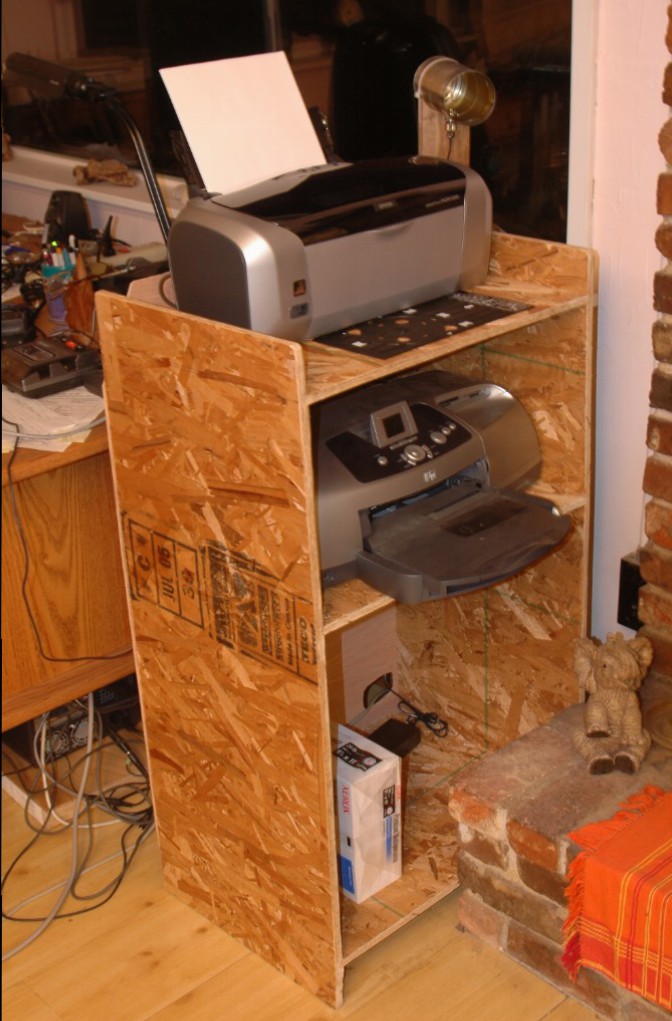
Construction is routed dados for shelves with glue and staples.
This is a claim for my technorati blog.
RSS 2.0 feed for Coppermine…
I didn’t write this. Credits are in the file.
I tried to contact the author, but his site is down.
RSS 2.0 feed for Coppermine…
I didn’t write this. Credits are in the file.
I tried to contact the author, but his site is down.
And he is greek.
I have tested this with CM 1.4.3 and it works.
To install, copy it to the coppermine base directory.
You can choose various types of feeds by using the following:
http://www.yoursite.com/coppermine/rss.php?album=xxx
where xxx is:
Edit the file to change the number of thumbs in the feed.
The script is RSS 2.0 compliant and works with feedreader.
Apologies to the author if he doesn’t like me passing this on.
I found it in his coppermine integration for joomla.
Cheers,
Here are the links for RSS feeds for my site.
Here are the links for RSS feeds for my site. Right click and “copy shortcut” and then paste into your feed reader. Clicking on these links will get you pages of XML.
A Log of Pingomatic troubles.
I’m going to log this problem just so we remember it.
12 Jan 2006 – I noticed that writing a post never returned. And I thought it was a server problem.
13 Jan – In discussions and rooting around in the options I discovered the removing the pingomatic link in options cleared up the problem. Looked like Pingomatic was down. I could not reach it’s website at http://pingomatic.com, but the service would answer a TCP/IP ping.
14 Jan – I checked again and ping answered the website, so I put info for my site into that page. And then I re-installed http://rpc.pingomatic.com in the write options and the post worked correctly.
I’ll log other issues with pingomatic here.
The new SMF based boards are live on the site.
The old boards are still available, but are locked.
I’ve converted the phpBB2 forums on my site to Simple Machines Forums. Along the way I ran into some problems.
The convert.php module for conversion from other boards to SMF has at least two problems:
As far as I know this is a complete fix for the problems. After running this version, the attachments correctly display as images in the posts. Missing images have width/height set to [20,20] to avoid the loop.
Fixed Convert 1.1RC2
Here’s the link back to the SMF boards: 1.1Converters
djd


 Windy Weather