
VNC, or remote administration, allows a remote desktop service between windows and linux. If you are like me you have a mixed network, and it is nice to be able to reach the linux box from a windows box. One my major interests is to be able to run a Kdevelop app from my windows laptop while I’m watching TV.
Continue reading “Configure VNC on SUSE 10.1”
Category: Computers
Hellraiser Box for Linux
This is a port of the Hellraiser box to Qt / KDE / Kdevelop on SUSE 10.1.
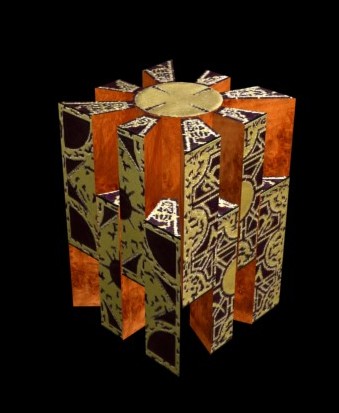
To run the program, use fileroller to unpack the file in a directory and then run the program. The image files must be in the same directory as the program. The instructions are essentially the same as for the Windows Version.
Hellraiser Lament Box Program
The sources are provided here. They are built using KDevelop 3.3.5 and Qt.
Hellraiser Lament Box Sources
There are links in the debug and optimize src directories that point back to the images in the src directory. These may have to be remade after you unpack the archive since links are not relative.
Update: Find the programs on SourceForge.
Enjoy. :-D
Hellraiser Box in OpenGL

Here is a simple application using OpenGL that displays the Lament Box with animation of the box opening and closing.
— updated with an MFC application and Source —
Continue reading “Hellraiser Box in OpenGL”
Google Sitemaps for Coppermine
Google has help and services for Webmasters. Among the things they provide and encourage are sitemaps. However, it’s not as complex as it all seems. WordPress and coppermine, and many other CMSs have scripts that generate these sitemaps. There are tools that run from your computer too, but these can’t know the internal structure of the site database, and so they are inefficient or don’t work for dynamic sites like WordPress and Coppermine.
With over 2000 images in my photo site, it seemed useful to generate a Google Sitemap for the Coppermine gallery. After some searching a plug-in turned up in the Coppermine Forums.
This plug-in is fairly primitive and when I tried it, it failed with an error on Google. Google produced an error about the first URI produced by the script. Also, the entire sitemap was produced as one single line, so error messages or looking at the sitemap with an editor were not user friendly.
I have repaired the script and you can find the new version by the link below. It is advertised to work for CPG 1.2.x, 1.3.x and 1.4.x. For more information, read the forum post above.
To use the script, unzip and upload it to the base coppermine directory on your site and then activate it from the browser with a URL like: http://www.yourdomain.com/cpg144/sitemap.php
Then visit the Google Webmasters Site,
- create an account, or log in with your google email account,
- add your site, using the Coppermine base directory, and
- then verify your site using one of the methods provided and finally
- point to your sitemap to tell google about it.
d
Sitemaps for better searching with Google
Google has help and services for Webmasters. Among the things they provide and encourage are sitemaps. However, it’s not as complex as it all seems. WordPress and coppermine, and many other CMSs have scripts that generate these sitemaps. There are tools that run from your computer too, but these can’t know the internal structure of the site database, and so they are inefficient or don’t work for dynamic sites like WordPress and Coppermine.
Sitemaps tell google about the content of sites that have dynamic content. You can find out more about services for Webmasters at google. You will need to log into an account to see these pages, but accounts are free.
You will want to look at this page to find plugins or programs to build sitemaps for your site. For example, there is a plugin for WordPress to build sitemaps – WordPress Sitemap Plug-in.
There is also a php file to build sitemaps for Coppermine.
d
Protected: Disk Maintence Utility
Web Calendar Public Access
Here are the settings that are working for me to allow public access to my webcalendar for some events. WebCalendar 1.0.4.
I’m still having problems with both public entries being duplicated when both Darrell and Public are participants. This does not occur on a test site that I have, but the live site shows this. Currently I can get around this by only having one participant [public access] for public items. Not sure why the test site shows only one entry and the live site shows two.
Continue reading “Web Calendar Public Access”
WebCalendar import for Chaos Manager
After using Chaos Manager calendar for the past year or so, I wanted to start with a web calendar so I could access the calendar from multiple systems. Web Calendar looks like the simplest and most reasonable free solution based on php and mysql.
After some study, writing a new import method wasn’t that hard. The enclosed zip file contains two modified php files and a new import file. It worked to import about 130 events into WebCalendar 1.0.4.
I never used repeating events, so no provision is made to import repeating events into WebCalendar.
Chaos Manager has some limitations.
- It cannot be accessed from multiple systems, although it will synch up with a PDA.
- It does not store event durations, but only an event time.
- For some reason, Chaos Manager csv files are not comma delimited but semi-colon delimited.
Download the new import code.
ChaosManagerImport.zip
Cheers,
darrell
Labeling DVDs
Use folder images to label your DVDs and CDs…
Late last year I purchased an Epson R200 printer that can print on CDs and DVDs. I wrote an article over in the boards and showed some pictures.
I’ve been using the printer to label movie DVDs for a while, but the problem of labeling data DVDs has eluded me. Here’s a solution, and since the printer has a high resolution, it works quite well.

Even the full size as rendered here is not easy to read, but the DVD itself can be read quite easily, although you may need to use a loupe to do it.
I just brought up the DVD in the explorer and then did screen cuts from the folder tree. Arranged in a reasonable way around the DVD label, the contents of the DVD are easily summarized. Of course, the best thing to do is also index the DVDs for easy searching later. This article describes my experiences with Google desktop and SpindleSearch.
d
End of the Semiconductor Roadmap
Ideas from a talk by Eli Yablonovitch, UCLA, regarding the future developments semiconductor technology and its impact on Physics, Economics and Sociology. From his lecture on 25 October 2005 at UCLA. [Click title to read more]
Here are some of the ideas from a talk by Eli Yablonovitch, UCLA, regarding the future developments semiconductor technology and its impact on Physics, Economics and Sociology. From his lecture on 25 October 2005 at UCLA. Here is a link to Eli Yablonovitch’s UCLA page.
In addition to a history of semiconductor industry growth, and feature shrinkage, there are some surprising points he makes in this talk:
Continue reading “End of the Semiconductor Roadmap”
 Windy Weather