Just images I’ve uploaded to put into game forum posts by linking here.
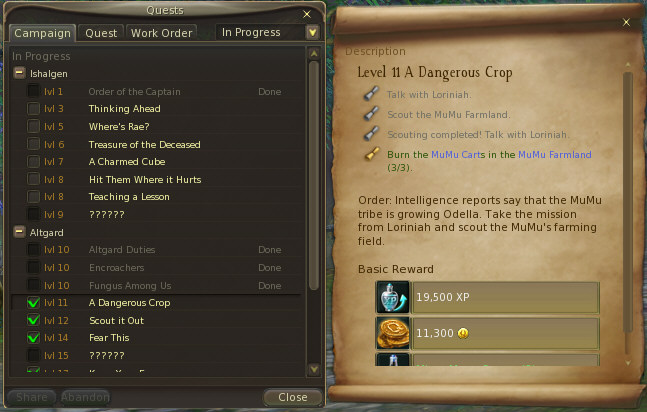

Just images I’ve uploaded to put into game forum posts by linking here.
The latest email from OpenDNS has been flagged by Windows Live Mail on Windows 7 as a phishing attempt apparently:

Here are the details from the email:
Return-Path: <newsletter-bounces@opendns.com>
Delivered-To: GMX delivery to windyplayer@gmx.com
Received: (qmail invoked by alias); 17 Feb 2011 17:55:07 -0000
Received: from m67.sfo.opendns.com (EHLO m67.sfo.opendns.com) [67.215.68.105]
 by mx0.gmx.com (mx-us001) with SMTP; 17 Feb 2011 12:55:07 -0500
Received: from m54.sfo.opendns.com (m54.sfo.opendns.com [67.215.68.145])
 by m67.sfo.opendns.com (8.14.3/8.14.3/Debian-5+lenny1) with ESMTP id p1HHt7AN005450
 (version=TLSv1/SSLv3 cipher=AES256-SHA bits=256 verify=NOT)
 for <windyplayer@gmx.com>; Thu, 17 Feb 2011 17:55:07 GMT
Received: from localhost ([127.0.0.1] helo=lists.opendns.com)
 by m54.sfo.opendns.com with esmtp (Exim 4.69)
 (envelope-from <newsletter-bounces@opendns.com>)
 id 1Pq84E-0008Pa-4k
 for windyplayer@gmx.com; Thu, 17 Feb 2011 17:55:02 +0000
Date: Thu, 17 Feb 2011 17:55:02 +0000
To: windyplayer@gmx.com
From: Allison Rhodes <marketing@opendns.com>
Subject: [OpenDNS] February 2011 Newsletter - Home Edition
Message-ID: <50d3d7955f49e9336720738ab05c89a1@lists.opendns.com>
X-Priority: 3
X-MessageID: 101
X-ListMember: windyplayer@gmx.com
Precedence: bulk
Errors-To: newsletter-bounces@opendns.com
MIME-Version: 1.0
Content-Type: multipart/alternative;
 boundary="b1_50d3d7955f49e9336720738ab05c89a1"
X-GMX-Antivirus: 0 (no virus found)
X-GMX-Antispam: 0 (Mail was not recognized as spam);
 Detail=5D7Q89H36p7HKxCVe41YRZxu4X4easLw8FopDTu/SvPZoLCWaicuN98U46fbCsKa9cJT4
 SbLgNcly1rvzJazPF3zfowb5EuQVtoKrGhICOZPgQJRcbpzwsdWXT/CL3rDXHR2gxPleCqaNqQss
 YRh/uvSjZjqq0hbV1;
I’ve written a photo resizer program, which can be found here on Source Forge.
I’m now porting the program to Linux, which is no issue except when it comes to getting it to run on a system where the development environment is not installed. I’ve installed the following packages: libqtcore4, libqtgui4. The program runs fine, except that JPG support does not work. PNG works fine.
The image plugins are there in both usr/lib/qt/plugins and usr/lib32/qt/plugins. Although the list is not the same which is strange.
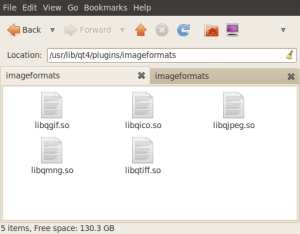
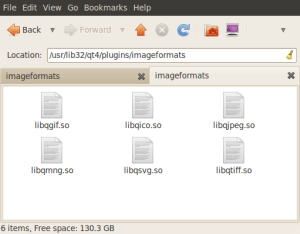

So why won’t JPG images load into my program?
– Windy
Update: Restart to clear the error below and then install the [recommended] driver. All is well as far as I can tell.
Using Ubuntu 10.04 LTS.
Zotac GeForce 9300 Motherboard

attempted to install the [recommended] choice and it failed.

With a previous install, this worked, but then system failed to start graphics when it rebooted. But that system used to have an AMD video graphics driver installed, so I reinstalled the entire system and now this occurs.
How can I clean out the “archives” and try this again?
– windy
Images.

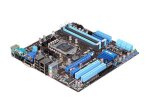


 Here are some details of the Remote Gaming Console idea.

I like to play games, like millions of the rest of us. And I have several machines to do that, unlike many of us. But my career was software engineering, so that’s to be expected.
But I have a problem that millions of the rest of us have too. Gaming laptops don’t work very well for serious gaming, and gaming desktops work great, but are cumbersome to sit next to.
I’d much rather be sitting in my recliner with my 15 inch gaming laptop while I play my MMO, or Black Ops, or whatever, than propped up in an office, or gaming chair, in front of my big screen gaming desktop.

The Jetway Atom D525 based system is running with Ubuntu 10.04.
The goals for the system are:
Update:
Just installed Ubuntu 10.04 x64 on a mini-ITX system and would like to play DVDs. I’d like to use this as an entertainment system.
It plays non-protected DVDs just fine.
I have followed instructions here:
https://help.ubuntu.com/community/RestrictedFormats/PlayingDVDs
Including the part about chmod chgrp in the trouble shooting part.
But protected DVDs give me this error:

Here’s the package manager showing what’s installed that might be relevant:

Any clues about what might be wrong?
Thanks,
windy

Based on a forum post, the AlienFX hardware now works, but if you use this software on Win 7 x64, there appears to be a problem.
It was indicated that the Alien Fusion component would not work, but the problem is that there is a memory leak or other problem that causes the program to apparently grow without bound. After several hours, I found that the AlienFusionController.exe was 1.7GB image size in memory. Clearly a problem. Continue reading “AlienFX Software – Bugs / Workarounds”
 Windy Weather