
[SOLVED] See bottom for solution.
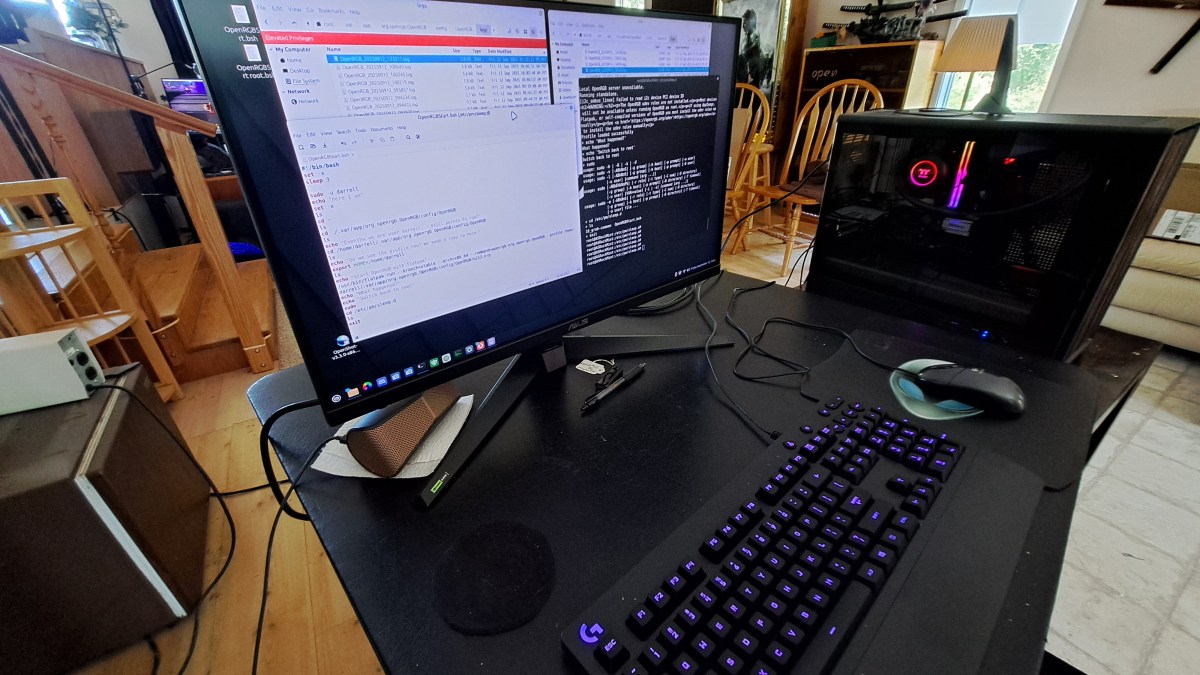
I’m using OpenRGB to light up my Logitech G213 keyboard. This is on Linux Mint 22.2. I added a command to the startup events so OpenRGB starts when the system boots. That works great, but OpenRGB does not automatically start on resume from Suspend.
Here’s a summary of what I have so far.
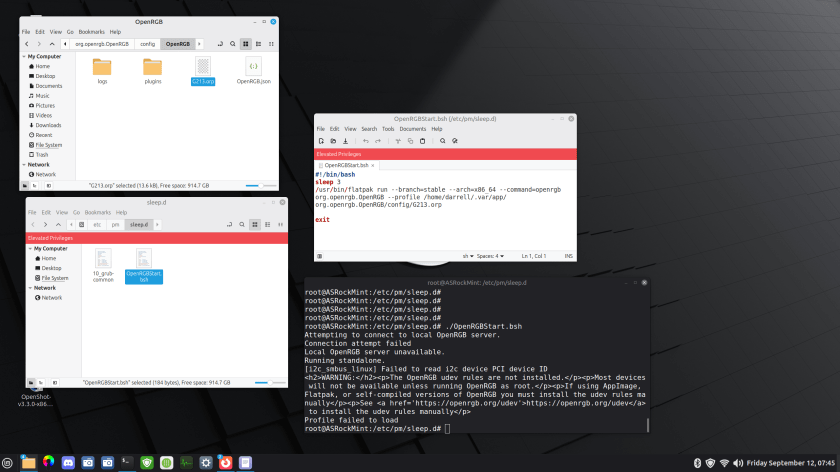
There is a bash script in /etc/pm/sleep.d that runs OpenRGB. The problem is that it fails to find the profile. There is apparently something I don’t understand about the environment. There is a terminal, set to root, and set to the /etc/pm/sleep.d directory. So I get the same error when I run the script from there.
Tracking Down The Error
The error from running this in a local root terminal is:
root@ASRockMint:/etc/pm/sleep.d# ./OpenRGBStart.bshAttempting to connect to local OpenRGB server.Connection attempt failedLocal OpenRGB server unavailable.Running standalone.[i2c_smbus_linux] Failed to read i2c device PCI device ID<h2>WARNING:</h2><p>The OpenRGB udev rules are not installed.</p><p>Most devices will not be available unless running OpenRGB as root.</p><p>If using AppImage, Flatpak, or self-compiled versions of OpenRGB you must install the udev rules manually</p><p>See <a href='https://openrgb.org/udev'>https://openrgb.org/udev</a> to install the udev rules manually</p>Profile failed to load
So something I don’t understand about the environment. The flatpak works, the OpenRGB app runs. And the server / client messages are of no consequence.
The command script is as follows:
#!/bin/bashsleep 3/usr/bin/flatpak run --branch=stable --arch=x86_64 --command=openrgb org.openrgb.OpenRGB --profile /home/darrell/.var/app/org.openrgb.OpenRGB/config/G213.orpexit
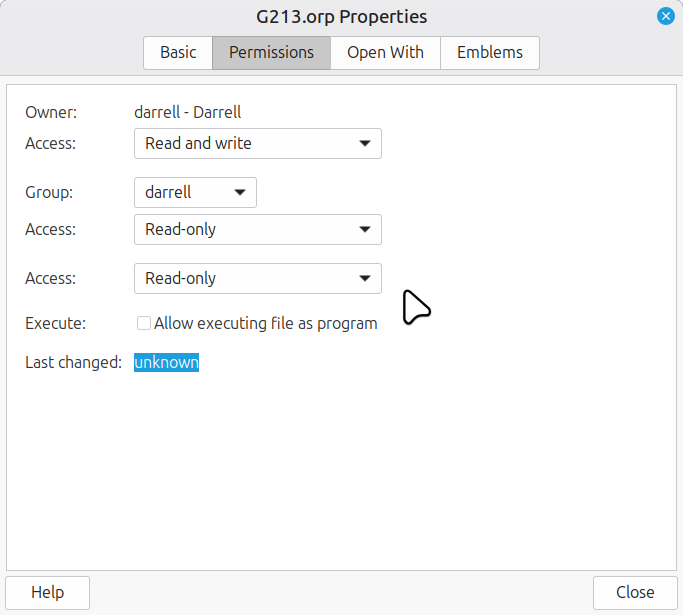
The profile file has the following permissions:
What else should I try?
Progress But Not There Yet
So apparently, root does not have the context to run the OpenRGB program. So I switched to my user – Darrell – using sudo. But then darrell running OpenRGB was not able to see the profile. It seems that switching user does not switch ~ [Tilde] the understanding of the user home directory. So it was looking for the profile in the root directory tree. So I copied the profile to the root folder tree. It finds the profile in this case – there is a message to that effect. However the profile is not correctly applied since the keyboard does not light up.
Here’s the terminal log of OpenRGB running interactively:
root@ASRockMint:/etc/pm/sleep.d# root@ASRockMint:/etc/pm/sleep.d# root@ASRockMint:/etc/pm/sleep.d# root@ASRockMint:/etc/pm/sleep.d# root@ASRockMint:/etc/pm/sleep.d# ./OpenRGBStart.bsh+ sleep 3+ sudo -u darrellusage: sudo -h | -K | -k | -Vusage: sudo -v [-ABkNnS] [-g group] [-h host] [-p prompt] [-u user]usage: sudo -l [-ABkNnS] [-g group] [-h host] [-p prompt] [-U user] [-u user] [command [arg ...]]usage: sudo [-ABbEHkNnPS] [-r role] [-t type] [-C num] [-D directory] [-g group] [-h host] [-p prompt] [-R directory] [-T timeout] [-u user] [VAR=value] [-i | -s] [command [arg ...]]usage: sudo -e [-ABkNnS] [-r role] [-t type] [-C num] [-D directory] [-g group] [-h host] [-p prompt] [-R directory] [-T timeout] [-u user] file ...+ echo 'here I am'here I am+ set -x+ ls10_grub-common OpenRGBStart.bsh+ cd /root+ lsDesktop+ cd ./.var/app/org.openrgb.OpenRGB/config/OpenRGB+ lsG213.orp logs OpenRGB.json+ echo 'Eventho we are user darrell, ~ still points to root'Eventho we are user darrell, ~ still points to root+ cd /root/.var/app/org.openrgb.OpenRGB/config/OpenRGB+ lsG213.orp logs OpenRGB.json+ echo 'Do we see the profile now? We made a copy to here.'Do we see the profile now? We made a copy to here.+ echo 'Start OpenRGB with flatpak'Start OpenRGB with flatpak+ /usr/bin/flatpak run --branch=stable --arch=x86_64 --command=openrgb org.openrgb.OpenRGB --profile /root/.var/app/org.openrgb.OpenRGB/config/OpenRGB/G213.orpAttempting to connect to local OpenRGB server.Connection attempt failedLocal OpenRGB server unavailable.Running standalone.[i2c_smbus_linux] Failed to read i2c device PCI device ID<h2>WARNING:</h2><p>The OpenRGB udev rules are not installed.</p><p>Most devices will not be available unless running OpenRGB as root.</p><p>If using AppImage, Flatpak, or self-compiled versions of OpenRGB you must install the udev rules manually</p><p>See <a href='https://openrgb.org/udev'>https://openrgb.org/udev</a> to install the udev rules manually</p>Profile loaded successfully+ echo 'What happened?'What happened?+ echo 'Switch back to root'Switch back to root+ sudousage: sudo -h | -K | -k | -Vusage: sudo -v [-ABkNnS] [-g group] [-h host] [-p prompt] [-u user]usage: sudo -l [-ABkNnS] [-g group] [-h host] [-p prompt] [-U user] [-u user] [command [arg ...]]usage: sudo [-ABbEHkNnPS] [-r role] [-t type] [-C num] [-D directory] [-g group] [-h host] [-p prompt] [-R directory] [-T timeout] [-u user] [VAR=value] [-i | -s] [command [arg ...]]usage: sudo -e [-ABkNnS] [-r role] [-t type] [-C num] [-D directory] [-g group] [-h host] [-p prompt] [-R directory] [-T timeout] [-u user] file ...+ cd /etc/pm/sleep.d+ ls10_grub-common OpenRGBStart.bsh+ exitroot@ASRockMint:/etc/pm/sleep.d#
So here’s the context – screen image with various folders etc.
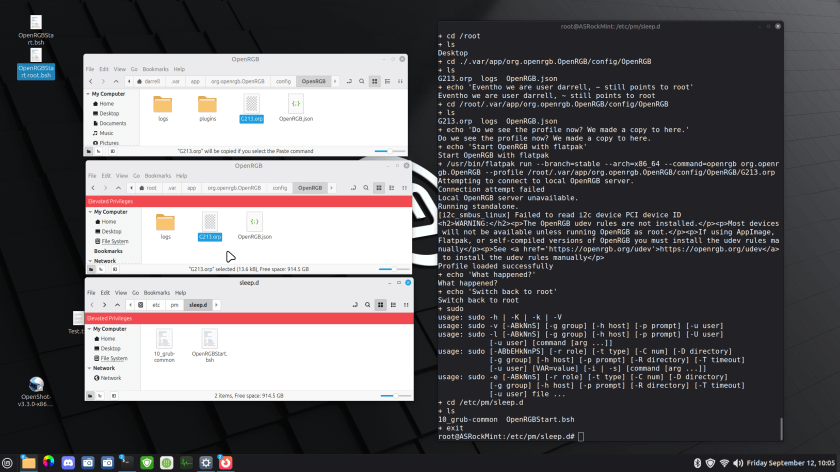
So works on reboot, but it does not work when resuming from suspend. It says the profile loaded correctly – and it’s a copy of the one that works in the context of the Darrell user when launching OpenRGB. No clue what’s wrong at this point.
Minor Tweaks
I’ve made some minor tweaks to the script. But still no joy. Here’s a video showing the problem.
The latest version of the script is here:
#!/bin/bashset -xsleep 3sudo -u darrellecho "here I am"set -xlscd ~lscd ./.var/app/org.openrgb.OpenRGB/config/OpenRGBlsecho "Eventho we are user darrell, ~ still points to root"cd /home/darrell/.var/app/org.openrgb.OpenRGB/config/OpenRGBlsecho "Do we see the profile now? We made a copy to here."export HOME=/home/darrelllsecho "Start OpenRGB with flatpak"/usr/bin/flatpak run --branch=stable --arch=x86_64 --command=openrgb org.openrgb.OpenRGB --profile /home/darrell/.var/app/org.openrgb.OpenRGB/config/OpenRGB/G213.orpecho "What happened?"echo "Switch back to root"sudocd /etc/pm/sleep.dlsexit
Thanks for your help.
:ww
[SOLVED] Use systemd-sleep to run script.
I posted a note in the Linux Mint forums, and got a response with the answer. Apparently the method I was working is not used on Linux Mint. But systemd does provide an answer.
Here is the new script which is put in /usr/lib/systemd/system-sleep/ and here is the current script OpenRGB-system-sleep.bsh
#!/bin/bashset -xcase $1 in post) sleep 3 sudo -u darrell echo "here I am" set -x echo "Eventho we are user darrell, ~ still points to root" cd /home/darrell/.var/app/org.openrgb.OpenRGB/config/OpenRGB ls export HOME=/home/darrell ls echo "Start OpenRGB with flatpak" /usr/bin/flatpak run --branch=stable --arch=x86_64 --command=openrgb org.openrgb.OpenRGB --profile /home/darrell/.var/app/org.openrgb.OpenRGB/config/OpenRGB/G213.orp echo "What happened?" echo "Switch back to root" sudo cd /etc/pm/sleep.d ls ;;esacexit
Here is a terminal log of me placing this script into the system directory and setting permissions to Execute:
darrell@GMKLinux:~$ cd Documentsdarrell@GMKLinux:~/Documents$ lsOpenRGB-Resumedarrell@GMKLinux:~/Documents$ cd OpenRGB-Resumedarrell@GMKLinux:~/Documents/OpenRGB-Resume$ lsOpenRGB-system-sleep.bshdarrell@GMKLinux:~/Documents/OpenRGB-Resume$ sudo cp OpenRGB-system-sleep.bsh /usr/lib/systemd/system-sleep/[sudo] password for darrell: darrell@GMKLinux:~/Documents/OpenRGB-Resume$ cd /usr/lib/systemd/system-sleepdarrell@GMKLinux:/usr/lib/systemd/system-sleep$ lshdparm OpenRGB-system-sleep.bshdarrell@GMKLinux:/usr/lib/systemd/system-sleep$ sudo chmod +x OpenRGB-system-sleep.bshdarrell@GMKLinux:/usr/lib/systemd/system-sleep$ lshdparm OpenRGB-system-sleep.bshdarrell@GMKLinux:/usr/lib/systemd/system-sleep$ ls -ltotal 8-rwxr-xr-x 1 root root 92 Oct 6 2022 hdparm-rwxr-xr-x 1 root root 598 Feb 26 08:42 OpenRGB-system-sleep.bshdarrell@GMKLinux:/usr/lib/systemd/system-sleep$ cd ~/Documentsdarrell@GMKLinux:~/Documents$
Works like a champ. Of course, replace my username – darrell – with your own and the profile name with whatever you chose for a profile. This script assumes that you have installed OpenRGB with Flatpak and not using another method. May your keyboards always be lighted.
:ww
 Windy Weather