

Note: Post is back dated by a year to keep it off the front page.
The latest Java app is progressing well. The AboutBox needs some modification to the text after it launches.
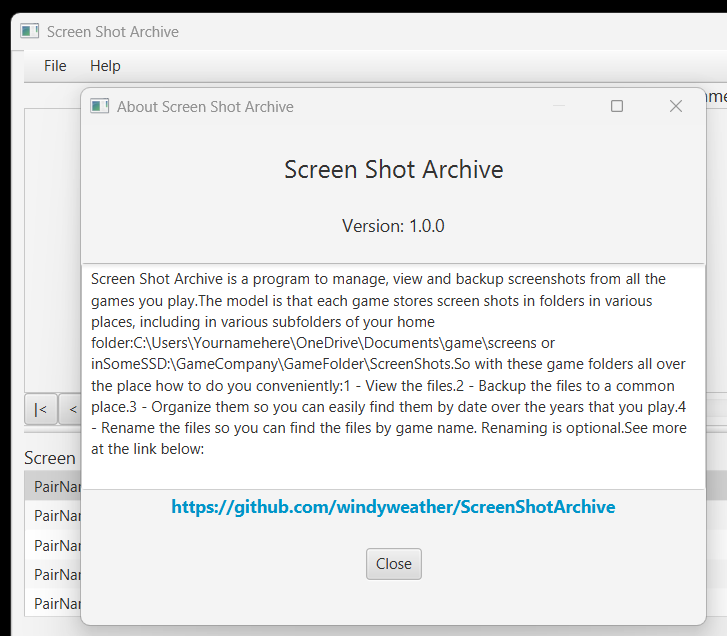
The app is built in JavaFx using IntelliJ. It is far along enough to build a modal AboutBox. The Box has a TextArea containing a description of the program is not editable. All that works fine. But the area can’t be formatted with new lines in the SceneBuilder, so the fix is to load up the content when the DialogBox launches. The code works to modify the TextArea with new text, but not when the Dialog Box is Shown. At that time, the changes have no effect on the TextArea.
The Problem
The code can’t get control at the right time. If the TextArea is modified at WINDOW_SHOWN time, the changes either don’t happen or are overwritten by the initialization code somewhere else. No change happens.
The code works correctly to set the TextArea when the Close Button action event code is changed to not close the box, but just modify the text. That works fine. The new text shows and is formatted correctly with additional new lines etc. The window event handler in the dialog class is getting control on every event listed here: https://docs.oracle.com/javase/8/javafx/api/javafx/stage/WindowEvent.html And they are all triggered, but SHOWN looks like the only one that might work. But if code in that event handler changes the TextArea – or any other control – there, nothing happens. How can that be too early? How can the code get control when it can modify the dialog items without user intervention?
The code for the app is here: https://github.com/windyweather/ScreenShotArchive Here is a picture and some code snippets of relevant areas.
About Dialog Box
Here is the About Dialog Box:
Code Snippets
Here are some relevant code snippets:
Main Window Controller button event that launches the About Dialog:
    /*
        Launch the about dialog, and wait until the user closes it
     */
    public void onAboutApplication(ActionEvent actionEvent) throws IOException {
        printSysOut("onAboutApplication - launch about dialog");

        Stage stageOfUs = (Stage) txtSelectedPairName.getScene().getWindow();
        Stage stage = new Stage();

        FXMLLoader fxmlloader = new FXMLLoader( AboutDialog.class.getResource("about-dialog.fxml"));
        Scene aboutScene = new Scene( fxmlloader.load() );
        AboutDialog aboutControl = (AboutDialog) fxmlloader.getController();

        Parent root = FXMLLoader.load(
                Objects.requireNonNull(AboutDialog.class.getResource("about-dialog.fxml")));
        stage.setScene(new Scene(root));
        stage.setTitle("About Screen Shot Archive");
        stage.initModality(Modality.WINDOW_MODAL);
        stage.initOwner( stageOfUs );

        // get the controller so we can call it with window events
        //ssCtrl = (SSController) fxmlLoader.getController();
        stage.addEventHandler( WindowEvent.ANY, new EventHandler<WindowEvent>() {
            @Override
            public void handle(WindowEvent event) {
                aboutControl.handleWindowEvent(event);
            }
        });


        printSysOut("onAbout - show about dialog");
        stage.show();
        // get the controller so we can call it with window events
        //  *** DOES NOT WORK ***
        //aboutControl.SetStuffUp();

    }
About Event handler and Dialog Modification Code:
  /*
        Wait until the window is "Shown" before we load up the TextArea with the content above.
        Before that it won't take. Like the TextArea doesn't fully exist or something.
     */
    public void SetStuffUp() {

        SSController.printSysOut("AboutDialog - SetStuffUp called");
        taAboutText.setEditable( true );
        taAboutText.clear();
        for (String s : sAboutText) {
            taAboutText.appendText(s);
        }
        taAboutText.setEditable( false );
        /*
            See if we can modify the version label
         */
        lblSSAVersion.setText("Nothing to see here");
    }
Window Event Handler:
    // handle window events here in the controller so we have access to
    // All the items and methods of the window. At last at WINDOW_SHOW and beyond.
    public void handleWindowEvent(WindowEvent event) {
        EventType<WindowEvent> state = event.getEventType();
        if (state == WINDOW_SHOWN) {
            System.out.println("About Window shown");
            /*
                We have to wait until here to rewrite the TextArea with the
                content with new lines in it. DOESN'T WORK
             */
            SetStuffUp();
        }
        if (state == WINDOW_SHOWING) {
            System.out.println("About Window showing");
            /*
                We have to wait until here to rewrite the TextArea with the
                content with new lines in it. DOESN'T WORK
             */
            SetStuffUp();
        }

        else if (state == WINDOW_HIDING) {
            System.out.println("About Window hiding");
        }
        else if ( state == WINDOW_CLOSE_REQUEST) {
            System.out.println("About Window close request");
        }
    }
Any ideas how code can get control at the right time to modify the About Dialog?
Thanks,
:ww
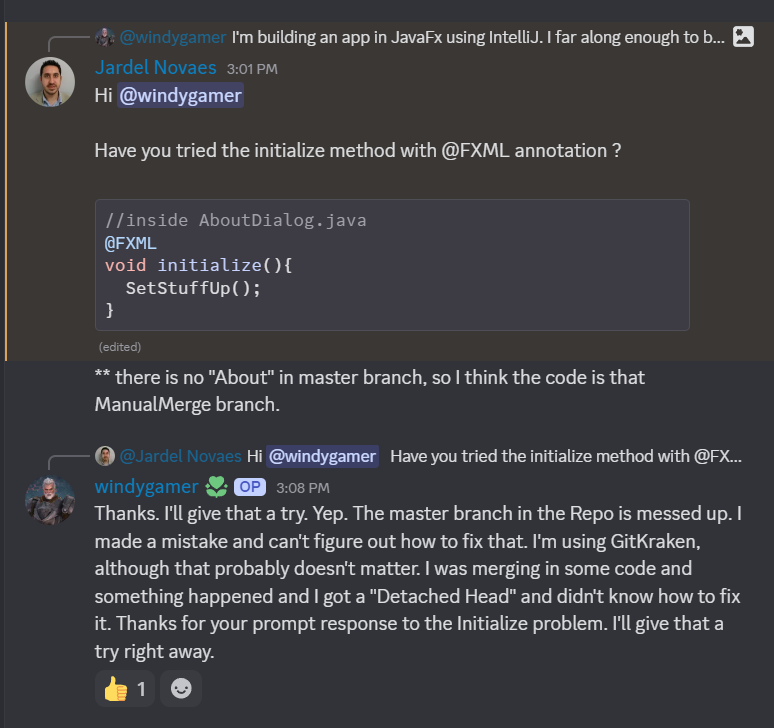
Update: That was Quick
I asked the question on the Together Java Discord channel. Here’s the fix came in before I even finished this post. The fix works great:
 Windy Weather